Full breakdown
How to Build and Run a Profitable AI Fanvue Model in 2026
This is the full breakdown of how to build and run a profitable AI influencer on Fanvue. Tools, workflow, what actually makes money, and what to avoid. No fluff, no upselling. Just what works.
Contents
Build the Character
Everything downstream depends on this. A weak character is hard to monetize no matter how good your traffic is. A strong one converts at every step.
Start with niche and identity
Pick a specific niche. Not "fitness girl". Something with actual personality baked in. The niche shapes the content, the fanbase, and what PPV you can realistically sell. Spend time on this before you generate a single image.
Then write her character bible. Cover how she speaks, her emoji habits, what she would never say, her backstory, and the specific things that make her different from every other model. Keep this document. You'll reference it constantly.
One important rule on character design
Fanvue has strict policies around age. Do not create characters with any under-18 visual cues. No schoolgirl themes, no youthful framing, nothing that reads ambiguous. Always specify clearly when prompting: adult woman, 22+, mature facial structure, adult proportions.
Reference images: the foundation of everything
The most important step. You generate a set of base reference images once and lock them in forever. Every future image and video uses these same references. If you swap them you lose visual consistency. Consistency is what creates attachment in fans.
Use Nanobanana Pro for this. In practice you only need two solid references: a good casual selfie and a clear full body shot. But getting those two to actually look right takes time. Expect to generate up to 10 images before you land on ones worth keeping. Once you have them, treat them as fixed.
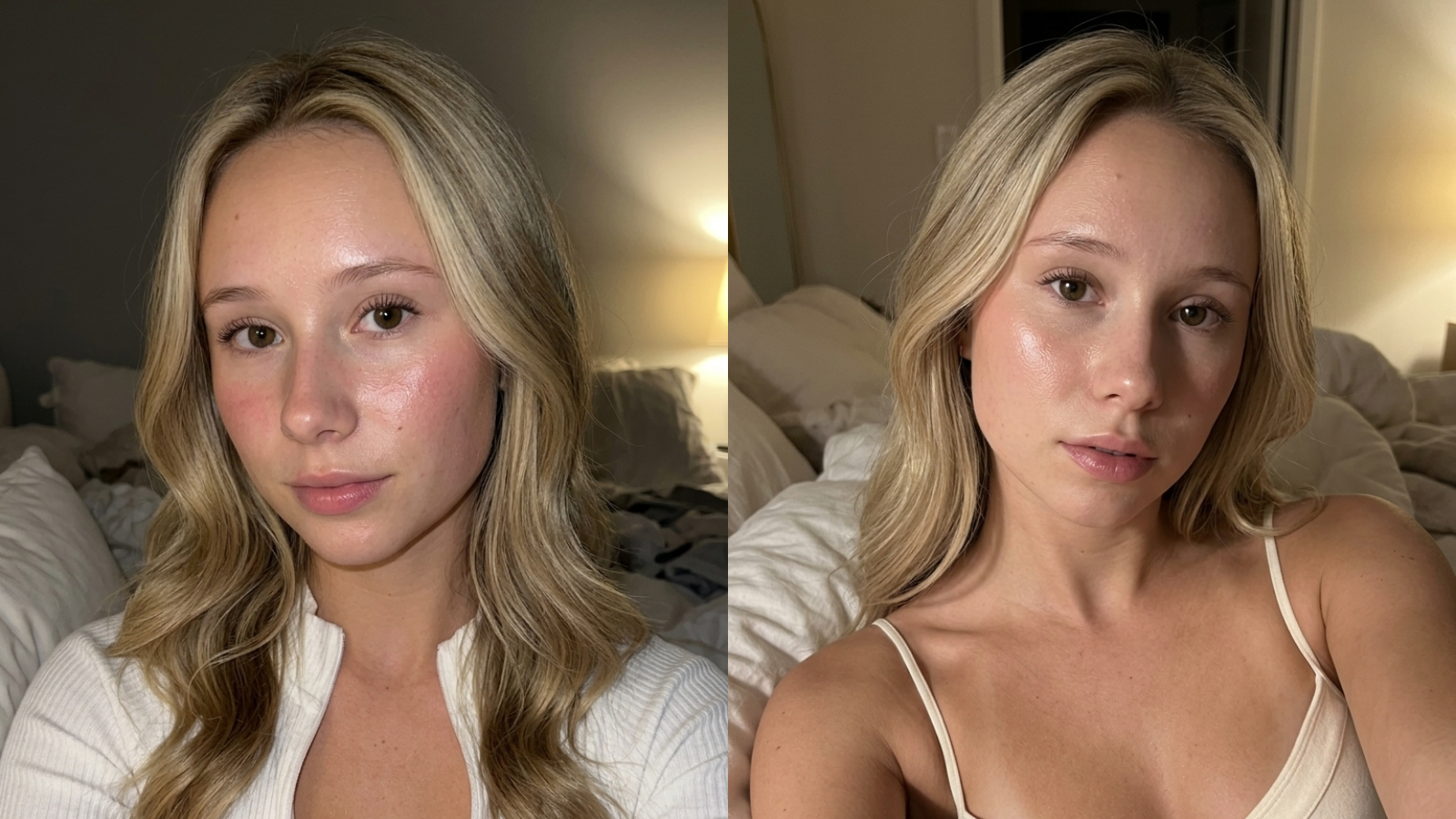
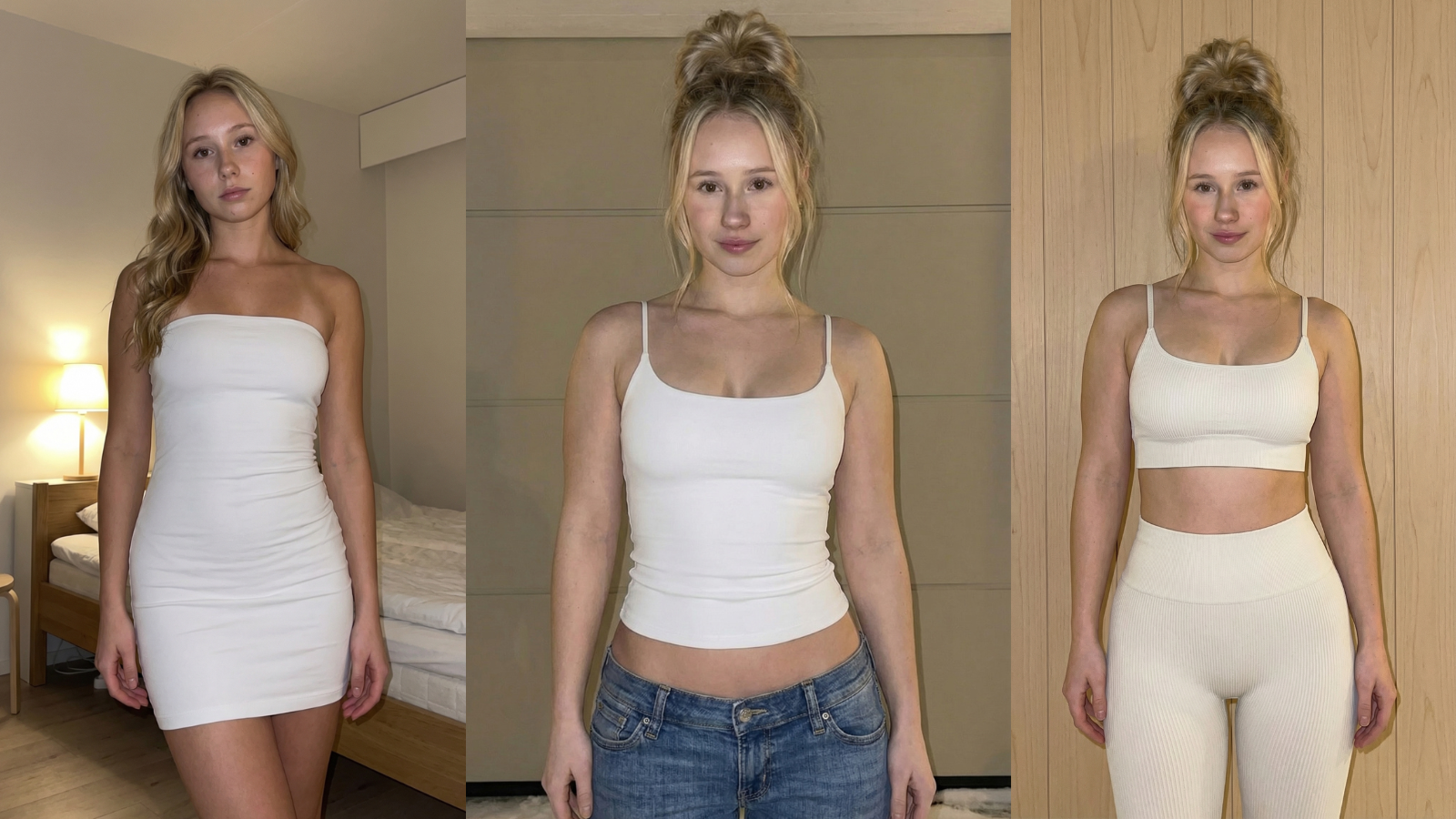
example reference sheet - multiple angles, same character
Generating content
The simplest way to get started: Higgsfield gives you access to Nanobanana Pro and Kling 3.0 on a single platform, starting around $10/month. That covers both SFW images and SFW video without juggling multiple tools or accounts. Other platforms exist but Higgsfield is my personal recommendation to start with.
For NSFW images, use Wavespeed with the seedream-v4.5/edit model. Wavespeed does not censor outputs and seedream is uncensored. Always attach your reference images so it pulls from the same character. Wavespeed runs on API credits. $5 is enough to start experimenting.
For NSFW video, Wavespeed with the wan-2.2/i2v model. Same API credit system.
Once this workflow is set up, content takes about 3 to 4 hours a week. Costs scale gradually with usage. You can start the whole setup for around $10/month and it grows from there as you generate more.
Example prompt: SFW selfie
This is the prompt structure that works reliably for consistent SFW character images in Nanobanana Pro. Adapt the scene. The identity and framing instructions stay the same.
A note on custom LoRAs and advanced tools: they exist, and you can go deep on them. but the image and video models available today are already good enough that custom LoRAs are not where your time is best spent, especially early on. the stack above is what i actually use. keep it simple and focus on the things that move the needle: character consistency, content volume, and the chat experience.
The IG Traffic Machine
This is the hard part. Be honest with yourself about it going in.
The tech is learnable in a week. The content workflow runs itself once it's built. Getting an Instagram audience that actually converts to Fanvue subscribers is where most people stall. It takes longer, it's less predictable, and there's no shortcut.
The setup
Run two accounts on completely separate devices and completely separate networks. This is a ban hedge. IG bans accounts in this niche. If both accounts share a device or network and one gets flagged, you lose both. Keep them fully isolated from day one.
No paid ads. Organic only. All content is SFW. IG is a traffic source, not a content platform. Everything explicit lives behind the Fanvue paywall.
Account warming
Do not start posting immediately on a new account. Spend a few days just using Instagram normally: browse, interact with posts, follow accounts. This signals to IG that the account is a real person and not a bot spinning up to spam.
Be intentional about what you interact with during this period. If your character is aimed at a Finnish audience, interact with Finnish content only. IG reads your engagement patterns to figure out who to show your content to. You can nudge that signal early by being deliberate about the niche you engage in before you post a single thing.
The link setup
Never link directly to Fanvue. Use an intermediary link tool instead. Direct Fanvue links get flagged and suppressed. Personal recommendations: GetAllMyLinks or Linkme. Both work well.
Update 3.6.2026
I no longer put any links in the bio at all, including third-party tools like GetAllMyLinks. IG occasionally moderates bio links and I've found that even indirect link tools can cause reach limits. Instead I use highlights and occasional story mentions. A highlight named something simple and on-brand drives consistent clicks without touching the bio. Also: keep the profile picture completely neutral. No suggestive content, no skin. IG actively checks profile pictures in this niche and it's one of the easiest things to get flagged on.
Content
The AI IG model needs to feel like a real person. Posts, stories, a consistent presence. Her voice on IG should be the same voice fans experience in DMs on Fanvue. Consistency is what makes the click from IG to Fanvue feel like following someone you already know.
Hooks and content quality
What she does on camera matters more than how she looks. Bedroom photos are generic. Activity-based content tied to her actual niche is what converts. A woman drinking at a rooftop bar, out on a hike, at a beach club. Something real and specific to who she is. That kind of hook stops the scroll and makes people curious. An AI dance video does not.
Occasionally let organic content hint that there is more without saying it directly. You do not need to spell it out. The right audience picks up on it and that tension is what drives subscriptions from people who are actually going to spend.
The niche should be visible in every post. If someone lands on the profile and cannot immediately understand who she is and what world she inhabits, the content is not specific enough.
Fanvue Setup
Pricing
The subscription fee is the door, not the money. Set it low, a few dollars, and keep it discounted permanently. The goal is to remove all friction between the IG click and someone being inside your page. The revenue comes from inside.
To put real numbers on it: across our pages, messages account for roughly 65% of all revenue, PPV posts another 10%, tips 5%, and subscriptions only about 14%. The sub fee matters for filtering out people who will never spend. A tiny barrier does that. But it is not the business. Chasing a high sub price at the cost of volume is the wrong trade.
Profile
The profile should feel like a natural extension of the IG presence. Same energy, same character voice. The welcome message that goes out to new subscribers is important. It's the first DM they get and it sets the tone for everything that follows.
PPV catalogue
Have a clear catalogue of what you sell and at what prices. Images, video clips, custom content. You'll iterate on this but you need a starting structure.
Why Fanvue
Fanvue has better API access than alternatives, which matters when you start automating. More creator-friendly split and less account volatility than other platforms. For AI OFM pages specifically, it's the right choice.
if you are creating a new Fanvue account, the link below uses my referral code. completely optional and costs you nothing, but it does support this guide if you find it useful. either way, same platform, same setup.
Create your Fanvue account (referral link, FV-5SWE4D)Where the Money Actually Is
The subscription fee is almost irrelevant to total revenue.
The money is in PPV sold through chat conversations. Fans who get into the chat experience and connect with the character spend. A single engaged fan can do $200+ across tips and PPV. The sub fee is just what gets someone through the door. What happens in DMs after that is the actual business.
To put real numbers on it: the earnings dashboard below shows $20,572 all-time across our pages, with June 2026 already at $8,102 by the 29th, the best month so far and ahead of May. The breakdown underneath is the part worth studying. Of $16,470 net over that period, $10,801 came from messages, $2,263 from subscriptions, $1,575 from posts, and $894 from tips. Messages outpace subscriptions by nearly 5 to 1.
One fan alone has spent $391 since February 2026: $202 on PPV, $144 in tips, with a top single purchase of $39.99. That fan is not unusual once the chat system is working properly.
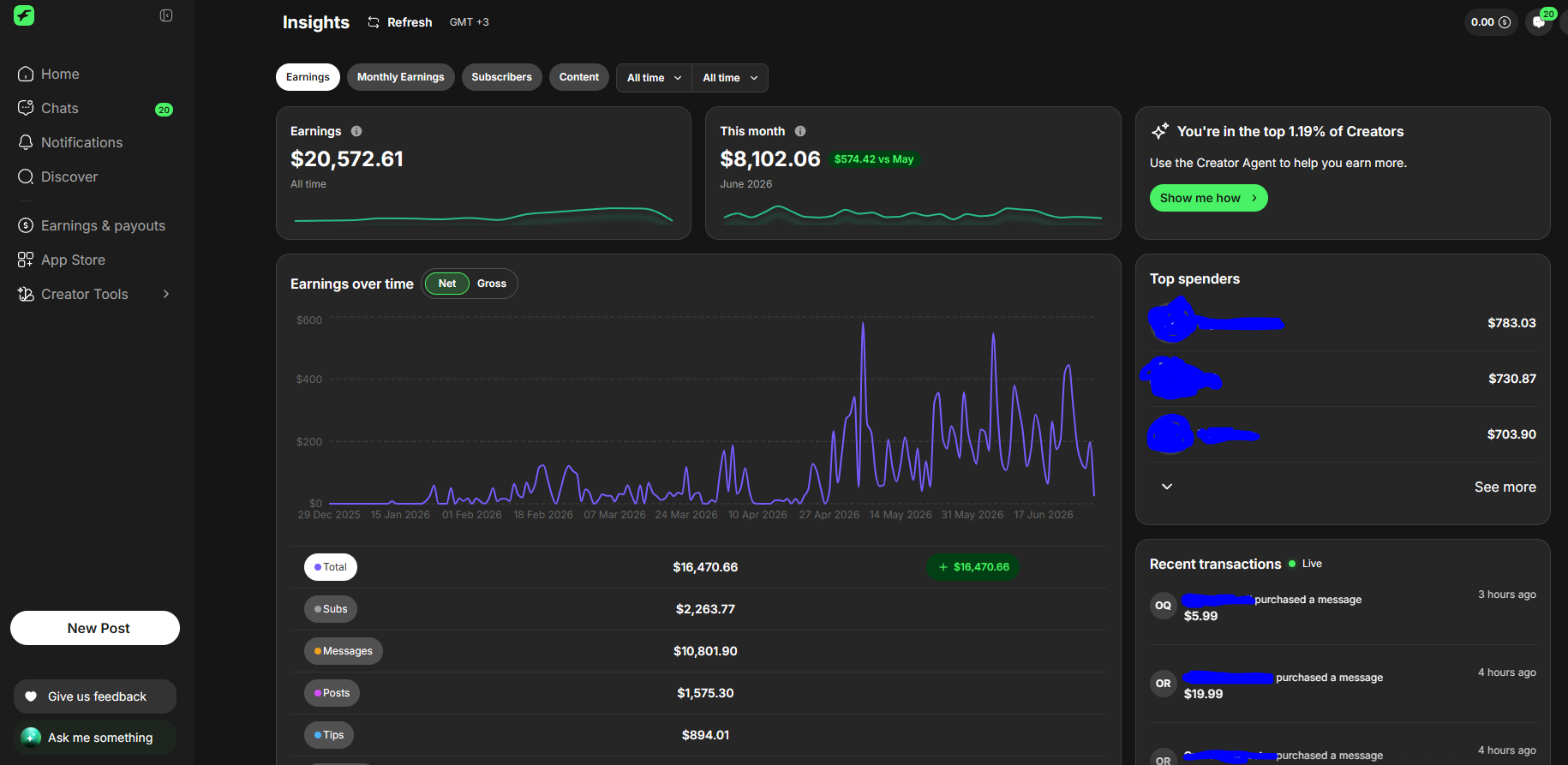
fanvue earnings - $20.5k all time, $8.1k in june 2026. messages outpace subs 5:1.
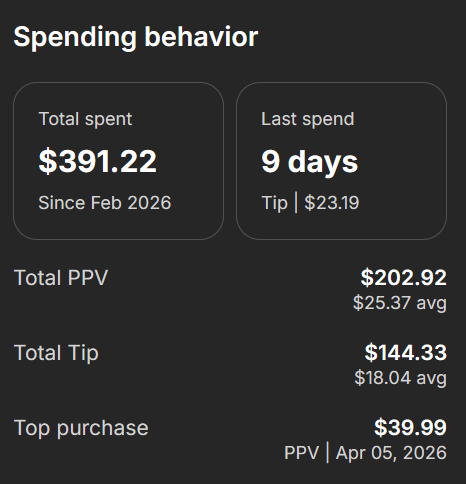
one fan. $391 since feb 2026. $202 PPV, $144 tips.
How the conversations work
You're not hard selling. You're maintaining a relationship and making offers at the right moment. A fan who just joined is in a different state than a fan who's been messaging for two weeks. The conversation reflects that.
Start manually. This is not optional.
Before you automate anything, run the chat manually for a few weeks minimum. Read your own fans. See which conversation patterns lead to purchases. See which PPV price points convert. See what makes someone go quiet and what brings them back.
This is where you build the actual knowledge that makes automation work later. If you skip this step and go straight to automation you're just automating guesswork.
Fanvue PPV Automation: When and How to Do It
At some point you'll wonder if the chat can be automated.
It can. But the order matters: learn your audience first, automate second. Generic chatbot behavior doesn't convert. A system built around what you've already seen work does.
Once you have that foundation, running chat manually forever has an obvious ceiling. You can only be in so many conversations at once. The fans who message at 3am don't get a reply until morning. The re-engagement that should happen seven days after a purchase doesn't happen because you forgot. At scale these gaps cost real money.
I took everything I built and learned: the automation workflows, the fan memory system, the PPV selling strategies, the re-engagement logic, and wrapped it into a native Fanvue app called FanWake.
It's not a generic chatbot. It has a persona layer built from the character bible, a selling layer with multiple modes depending on where a fan is in the relationship, fan memory that tracks purchases and conversation history per fan, and automated re-engagement so fans who go quiet get brought back at the right moment.
Try FanWake free
380+ creators have connected their Fanvue page, and FanWake has generated over $110,000 in creator revenue across 4,674 automated PPV sales. Free account, no card needed. Connect your page and see how it works before committing to anything.
Start for free →Questions about anything in this guide? [email protected]